Evaluate your localhost changes before you publish
Connect through MCP to automatically create a temporary Cloudflare tunnel, so Preveo can evaluate your localhost changes as you build, before you publish.
Connect your agent harnessFor tech teams that want to ship waaay faster with AI and confidence
Connect your AI assistant to Preveo through MCP to evaluate UI, compare changes, and investigate performance. Give your team shared evidence to guide fixes and review what ships.
FROM CODE CHANGE TO TEAM REVIEW
See how a frontend change becomes a pull request with evidence your team can review.
STEP 1 OF 3

AI build websites,
Preveo evaluates them
THE PR REVIEW DIFFERENCE
AI coding assistant using Preveo gives reviewers visual changes and check results, and alerts the right expert when something breaks.
Scroll to see the full graph →
Trusted by tech teams working at
 Google Shopify
BUILD. EVALUATE. IMPROVE.
From your agent harness to your team’s review, bring the evidence into every decision.
Connect through MCP to automatically create a temporary Cloudflare tunnel, so Preveo can evaluate your localhost changes as you build, before you publish.
Connect your agent harnessKeep your team focused while the agent works. When it needs a human decision, notify only the relevant reviewers and give them the evidence they need to help.
Ask your connected agent to onboard contributors from your Git repository. It can find available email addresses and send project invitations with the access level you choose.
“Invite this repository's contributors to my Preveo project as engineers.”
Review your page across screen sizes, browsers, themes, and languages. See where the experience breaks before your users do.
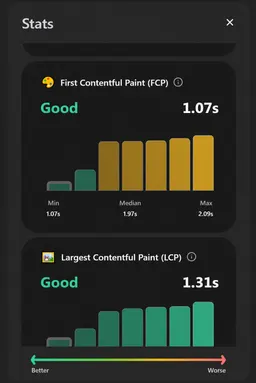
Automatically capture performance metrics, console errors, and failed requests as you review changes. Add focused macros to help explain the evidence and guide your next fix.
Compare your implementation with the intended design, or put before and after side by side. Review the spacing, typography, and layout that make the difference.
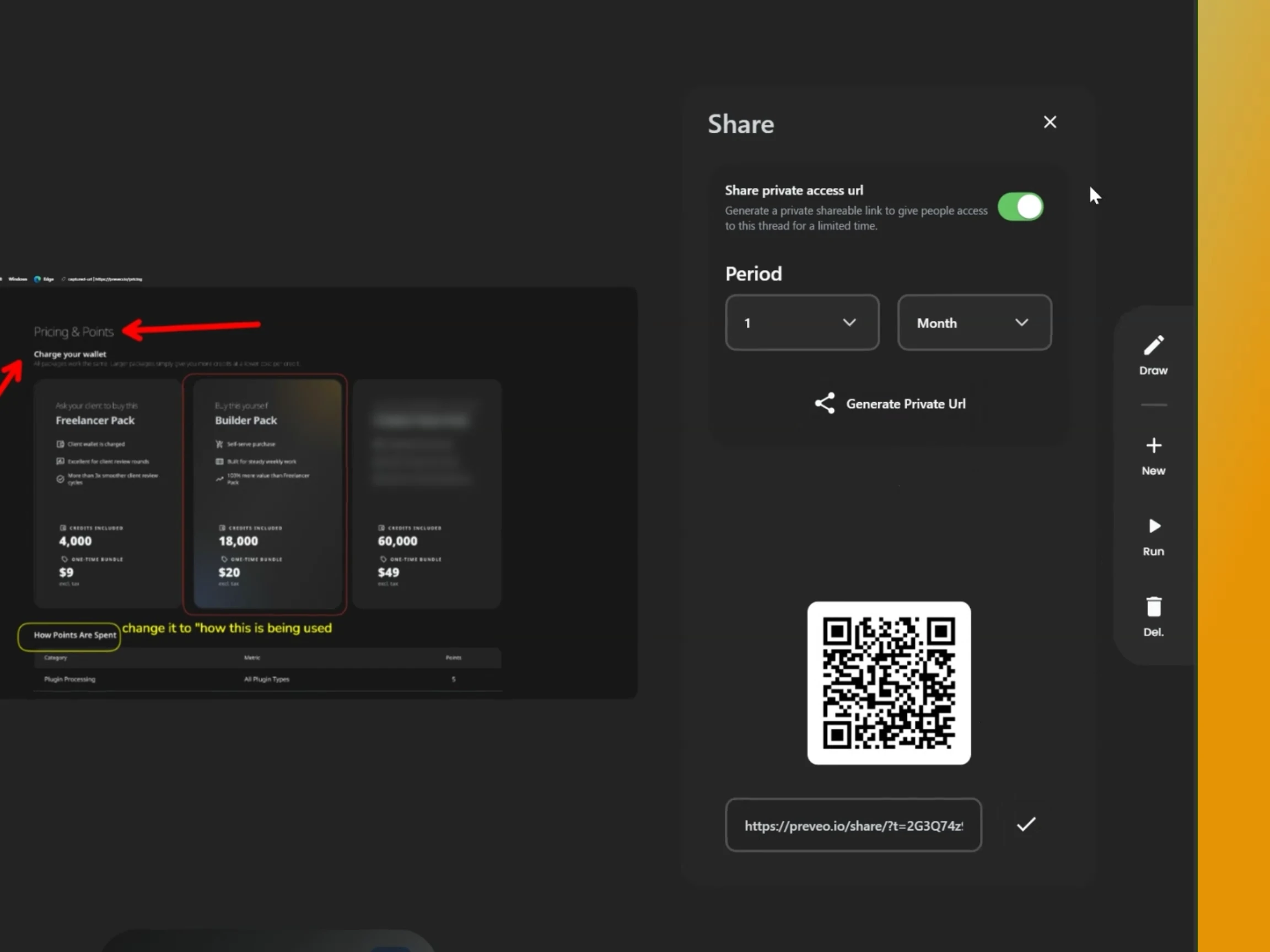
Invite teammates and clients to review a feature when it suits them. Keep their notes, bugs, and questions together in a shared thread for follow-up.
Get the browser extensionBring screenshots, recordings, comparisons, and reports together in project threads. Give teammates and clients the context to review what changed.
Give clients and non-technical stakeholders a clear view of project progress. Explore shared work and review changes at your own pace.
Connect through MCP to run evaluations, inspect screenshots and reports, and use findings to guide fixes and validate changes.
Connect your agent harness Browser sign-in. No API key to copy.“Check this pricing page on mobile and help me fix the issues.”
Macros
A macro evaluates your page and shows you what to improve. Choose a ready-made check for SEO, layout, copy, and more, or create your own.
See how clearly your page explains what you offer, and what could help AI assistants recommend it.
How it works
Review your website with the browser extension or connect your AI assistant through MCP.
Follow your agent's MCP setup instructions. For example, with the Codex CLI installed, run:
codex mcp add preveo --url https://api.preveo.io/mcp
codex mcp login preveoFollow your agent's sign-in flow, then create a Preveo account or sign in and approve the connection.
You can disconnect anytime in Preveo under Connected apps.
Open a new conversation with your agent and try:
Use Preveo to list my projects.
Or ask: “Push my changes and create PR”
Why Preveo?
What happens after AI says "Done"? Your builder helps you create the product. Preveo helps you judge whether it is ready to ship.
Keep the builder you love. Add a dedicated evaluation layer.
Scroll to compare| Building is only half the job. What happens after AI says "Done"? | PreveoEvaluation layer |  LovableBuilder / agent |  ReplitBuilder / agent |  BoltBuilder / agent |  Claude CodeBuilder / agent |  CodexBuilder / agent |  CursorComposer 2.5 Fast |  v0Builder / agent |
|---|---|---|---|---|---|---|---|---|
| Building and independent evaluation | ||||||||
| Primary job | Evaluate your product | Build your app | Build your app | Build your app | Build & fix code | Build & fix code | Build & fix code | Build your app |
| Generate code | ||||||||
| Suggest fixes to your code | ||||||||
| Can client/teammate evaluate the builder's work ? | ||||||||
| Need source code for a page review | Not required | Project-based workflow | Project-based workflow | Project-based workflow | Optional with browser tools | Optional with browser tools | Optional with browser tools | Project-based workflow |
| Repeatable quality, clear evidence, and client handoffReady-made checks for UX, SEO, AI discoverability, accessibility, responsiveness, and content. Choose the evaluations that matter to your product. | ||||||||
| Know what to check | Ready-made evaluations | Testing tools + prompts | App testing + prompts | Prompts / project tools | Skills / custom setup | Skills / custom setup | Rules / custom setup | Project tools + prompts |
| Use the same quality standard everywhere | Reusable macro criteria | Saved instructions / prompts | Skills / custom setup | Saved prompts / setup | Skills / custom setup | Skills / custom setup | Rules / custom setup | Saved instructions / prompts |
| Find problems you didn't know to ask about | ||||||||
| Run the exact review again | Re-run saved macros | |||||||
| Compare before vs after | ||||||||
| Show evidence, not just explanations | ||||||||
| Understand results without being technical | Visual, plain-language reports | |||||||
| Prove quality to a client | Shareable evaluation findings | |||||||
| Discuss findings together | ||||||||
| Share a review document | ||||||||
| Invite clients and teammates | ||||||||
| Estimated review costs | ||||||||
| Usage pricing basis | Shared credit wallet | Credits per message / work | Effort-based usage | Monthly token allocation | Subscription or API tokens | Subscription or API tokens | Model-based token usage | Usage credits |
| Responsive layouts | ~2.3–3.9× | ~50–150× | ~25–200× | ~5.1–26.8× | ~6.1–27.2× | ~6.1–27.2× | ~9.2–40.8× | ~6.1–27.2× |
| SEO | ~0.16–0.27× | ~12.5–37.5× | ~6–50× | ~1.8–5.3× | ~2.4–6.6× | ~2.4–6.6× | ~3.6–9.9× | ~2.4–6.6× |
| AI search / AEO | ~0.24–0.39× | ~25–75× | ~12–75× | ~2.5–7.3× | ~3.6–9× | ~3.6–9× | ~5.4–13.5× | ~3.6–9× |
| UX and conversion | ~1.4–2.4× | ~25–100× | ~12–100× | ~2.8–14× | ~3.8–16× | ~3.8–16× | ~5.7–24× | ~3.8–16× |
| Accessibility | ~1.7–2.8× | ~25–100× | ~12–125× | ~3.5–16.5× | ~4.4–18× | ~4.4–18× | ~6.6–27× | ~4.4–18× |
| Content and grammar | ~0.24–0.36× | ~12.5–25× | ~6–25× | ~2.5–5× | ~3.6–7.2× | ~3.6–7.2× | ~5.4–10.8× | ~3.6–7.2× |
| RTL and localization | ~2–3.3× | ~37.5–125× | ~25–150× | ~4.1–21.8× | ~5.3–23× | ~5.3–23× | ~8–34.5× | ~5.3–23× |
Built to work together. Use Preveo to find and understand the issues, then take the findings back to your builder to fix them.
Each range uses the same small-run AI cost reference. Larger checks can cost more for Preveo too. Estimates describe processing usage, not customer prices or measured savings.
Cost colors use the range midpoint: green: low (up to 5×), yellow: medium (above 5× to 20×), red: high (above 20×).
These estimates combine the macro runtime structure with assumed token budgets for each review. The code batches captured views into one processing request, uses a text or vision model according to the evidence, and renders a saved report template. The token budgets below are engineering assumptions, not measurements or fixed macro definitions.
The lower agent budget assumes a batched review. The upper budget assumes sequential evidence collection and analysis with repeated context; this is a scenario, not a claim about how every product operates. Image input is included as estimated token-equivalent evidence. Actual image charges and token counts differ by provider and tokenizer.
Preveo estimates use the repository defaults: DeepSeek V4.1 Flash for text and Gemini 3.8 Flash for images. Deployment settings and routing can change the model and price. Compilation and report-template creation are excluded because the estimate is for running an existing macro.
Claude Code estimates use Sonnet 5.5 API rates; Codex uses GPT-6.1 Sol Standard API rates; Cursor uses the higher-cost Composer 2.5 Fast scenario at $3 per million input tokens and $15 per million output tokens. Standard Composer 2.5 costs less ($0.50 input / $2.50 output per million tokens). These selected models do not represent every available model or subscription. Bolt uses the monthly Pro token-allocation equivalent, including the plan price spread across its allowance, rather than an incremental bill. These billing bases differ, so the table is not a comparison of actual customer spending.
Lovable estimates allocate the monthly Pro plan across its included credits and use the assumed per-review credit budgets above. The published examples cover small edits and app creation, not these audits; our review budgets are extrapolations. Chat-only reviews can cost less, and allowances can cover usage.
Replit estimates use assumed paid-request budgets informed by its July 2025 pricing recap, which described inexpensive simple requests and higher charges for involved work. Those historical examples are not a current price list or measured review costs. Current billing documentation confirms effort-based paid usage and Free Mode allowances. These ranges are scenarios, not guaranteed minimums or maximums.
v0 estimates use the published v0 Pro input and output rates with the same per-review agent budgets shown above. These estimate credit consumption before free allowances; they are not measured review bills. Other v0 options can cost less or more, and monthly or daily included credits can cover the usage.
All estimates exclude caching, cache writes, extra reasoning, validation retries, browser runtime, storage, hosting, provider fees, and taxes. Subscriptions and free allowances affect actual bills. Pricing checked October 5, 2026.
The workflow descriptions are our interpretation of the linked documentation. Builders and coding agents can also review rendered pages, collect evidence, and reuse instructions. Preveo makes independent product evaluation a dedicated workflow.
Re-running the exact review means reusing the same macro instructions and criteria, not guaranteeing identical AI findings. Before/after means re-evaluating the changed page and comparing findings. Launch-readiness checks help you assess the selected criteria.
This is our view of typical workflows, not a benchmark. “On request” means you direct the review; “with tools” and “custom setup” depend on integrations and configuration. Macros provide reusable review instructions; AI findings can vary between runs. Features vary by plan and change over time.
For “Discuss findings together,” a check means built-in comments or a shared chat. A cross means discussion needs a custom workflow or external tools. Hover over each mark for details.
For “Share a review document,” a check means a built-in shareable review report. A cross means generating a custom report or sharing a project/chat instead. Hover over each mark for details.
Explore the official product documentation:
Pricing
Create a free account, then buy credits when you need them. One-time packs. No monthly subscription.
$9one-time
Freelancer Pack · 4,000 credits
All pack prices exclude tax.
Explore for free. Buy credits when you’re ready.
Credits cover plugins, video captures, and storage. Larger packs give you more credits per dollar. See how credits are used.
FAQ
Anything else? Email us at support@preveo.io.
Preveo helps you review your website, spot issues, and understand what to fix. Check your pages across devices, run focused reviews, and share findings with your team or clients.
Create a free account, open your website with the Preveo browser extension, and choose the macros you want to run. Review the findings and use the suggested next steps to improve your page.
A macro is a focused check for your page, such as an SEO, accessibility, content, or UX review. Start with a ready-made macro, run a few together, or build a custom one for your workflow.
Yes. Preveo reviews the website you have built, whether you used an AI builder or wrote the code yourself. Your website stays where it is; Preveo works on top of the page to help you find issues before they reach production.
Yes. The Preveo browser extension lets you capture directly from localhost, so you can review a page while you are developing it, before publishing it.
Yes. You can create a free account, explore the dashboard, browse public crafts, and understand the workflow before you buy a credit bundle.
No. Preveo uses one-time credit bundles, so you only top up when your workspace needs more credits.
Credits cover paid usage such as plugins, video captures, runtime, and storage. Buy a one-time credit pack when you need more. Larger packs give you more credits per dollar, and the pricing page explains how credits are used.
Yes. Credits belong to the workspace, so invited teammates can use them according to their access.
Your next step
Start free with Preveo. Preview your page, find what needs fixing, and present work you can stand behind.
50 free welcome points
 Install Browser Extension